Hey there, let’s cut to the chase: if you’re dealing with flexo or gravure printing, you know anilox sleeves aren’t just a “set it and forget it” part. Mess up their alignment, and you’re looking at blurry prints, inconsistent ink laydown, wasted substrate, and way too many reprints. As a supplier who’s shipped thousands of these sleeves over the last 8 years, I’ve seen way too many shops skip the alignment step and cry over a $10k run gone wrong. Today I’m walking you through exactly how to get that alignment right—no fancy, overcomplicated jargon, just stuff I’ve tested in real print rooms, not a textbook. Anilox Sleeve
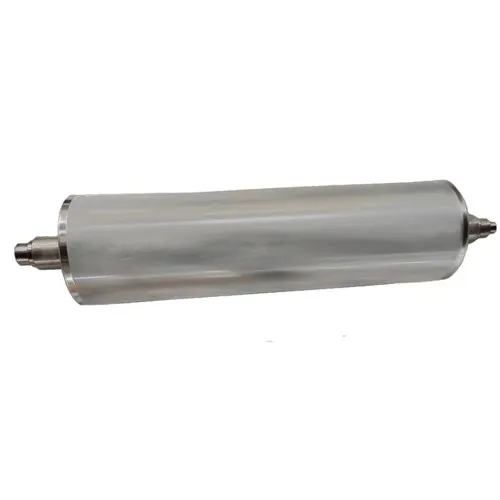
First, let’s get one thing straight: what “correct alignment” actually means here. I’m not talking about some industry secret. It boils down to two non-negotiables: 1) The anilox sleeve’s core runs dead-center on your press’s gear shaft (so it doesn’t wobble, and the ink cells line up perfectly with your doctor blade and plate cylinder), and 2) The sleeve’s rotation is phase-aligned with your plate cylinder’s marks. That second part is the one that trips people up the most—you can have a perfectly centered sleeve, but if it spins a tooth off from the plate, you’ll get ghosting or misregistered repeats, especially on longer runs.
Let’s start with the prep stuff, because rushing this is where mistakes happen. I always tell our customers to do a quick pre-check before touching the sleeve. First, make sure your press is level—no, really. I once had a customer who spent 2 hours aligning a sleeve just to find out their press frame was leaning 2 degrees, so every shaft was off. A simple level (the old bubble kind works, no need for a fancy laser here) across the top of the gear train will catch that. Next, inspect the sleeve and the shaft. If your sleeve has nicks on the core or the end flanges, that’s a problem—even a tiny burr will throw alignment off. And if the press shaft has rust or dried ink gunk scrub that off. I use a lint-free microfiber cloth with a little isopropyl alcohol—no scouring pads, you’ll scratch the shaft and the sleeve’s core. Also, double-check that your end caps (the ones that hold the sleeve on the shaft) are the right size. Too small and they’ll slip, too big and they’ll bow the sleeve, which makes alignment impossible. We include a set of spare end caps with every sleeve we ship, fyi—easy to grab if you need them.
Okay, time to mount the sleeve. Here’s where most people either over-tighten or under-tighten, which is a killer. First, slide the sleeve onto the shaft slowly—don’t just drop it. Keep it straight, no tilting. Once it’s on, hand-tighten the end caps first, then use a wrench to give them a quarter-turn more. That’s it. Don’t crank on them like you’re opening a pickle jar—over-tightening will warp the sleeve, and once a sleeve’s warped, alignment is a lost cause. I’ve had customers send back sleeves because they tightened the end caps so much the core bent; that’s not a defect, that’s a user error, plain and simple.
Now the actual alignment measurement. This is the part where people either use a $500 laser aligner (overkill) or a ruler (works, but tricky). Here’s my go-to method, used by every print shop that’s stuck with us for years. You’ll need a dial indicator (get a basic one, not the super fancy industrial kind—$50 at any hardware store works), a marker, and some painter’s tape. First, stick a small piece of painter’s tape on the end of the anilox sleeve, right where it meets the press frame. Then, mount the dial indicator to the press frame—make sure it’s not touching any moving parts—and set the tip of the indicator to touch the sleeve’s outer circumference, at the very edge of the end. Zero the dial. Now, slowly spin the shaft one full turn, keeping an eye on the indicator reading. If the needle moves more than 0.001 inches, your sleeve is out of alignment. To fix that, loosen the end caps just a little, nudge the sleeve slightly, then spin again. Repeat until the reading is dead zero. That’s how you get radial alignment—no wobble, so the ink lays evenly across the entire sleeve.
Now the part that’s way more important for print quality: phase alignment, or aligning the rotation of the anilox sleeve with your plate cylinder. This is what fixes that ghosting I mentioned earlier, especially on long runs like packaging or labels. First, find your key marks. Every good plate cylinder has a registration mark—usually a tiny cross or a number etched on the end. The anilox sleeve also has a mark, usually a small dot on the end flange (we add these to every sleeve we ship now, because so many customers asked for it). If you don’t have a mark on your sleeve, use a fine-tip marker to draw a tiny, clear dot on the end flange, right where it lines up with the plate cylinder’s mark. Here’s the trick: when you mount the sleeve, line up the anilox mark exactly with the plate cylinder’s mark before you tighten the end caps. If you have a run that needs perfect registration, you can even do a test: run a 1-inch square of substrate, hold it up to the light, and check if the ink mark lines up with the plate mark. If it’s off, loosen the end caps, nudge the sleeve a tiny amount (a 1/32 of an inch change will fix most phase issues), and re-run the test. I always tell customers to do this test with a blank piece of substrate first—no need to waste expensive print material on alignment checks.
Wait, what about doctor blade alignment? I know some people think that’s separate, but no—misaligned anilox will mess with the doctor blade, and vice versa. A quick note here: once your anilox is aligned, adjust the doctor blade so it’s sitting at a 45-degree angle, with just a hair of tension. If the blade is too tight, it’ll dig into the anilox cells, wearing them out faster, and if it’s too loose, it’ll leave extra ink on the sleeve. As your anilox supplier, we always give a quick blade adjustment cheat sheet with every order, because this is one of the most common mistakes new print shops make.
Now, the maintenance part, because alignment doesn’t stay perfect forever. After every run, remove the sleeve, clean it with a proper anilox cleaning solution (not just water and dish soap—dish soap leaves residue that clogs cells and throws alignment off). Store it hanging on a soft, padded rack, not leaning against a wall. Leaning can warp the core, which will make alignment impossible next time you mount it. Also, every 5 runs or so, do a quick check: spin the sleeve by hand, look for any wobble, and run a test square of substrate to check ink consistency. If you notice misalignment coming back, it’s probably because you tightened the end caps too much last time, or the shaft has a little gunk built up that you missed.
Let’s talk about common mistakes I see all the time, because learning from others’ mess-ups is way cheaper than learning from your own. First, “I’ll just align it once and forget about it.” No—if you switch ink colors, change substrate, or even move the press, you need to recheck alignment. I had a customer last month who ran 10,000 labels with a perfectly aligned sleeve, then switched to a thicker substrate and skipped the alignment check—ended up with 2,000 misprinted labels, all because the slight thickness change threw the phase alignment off by a hair. Second, using the wrong tool for the dial indicator. I’ve seen people use a tape measure to check for wobble, and that’s just not precise enough. A dial indicator picks up even tiny movements that a tape will miss. Third, not cleaning the sleeve before mounting. A few dried ink specks on the core can make the sleeve sit lopsided, leading to alignment issues.
And before you ask—yes, we stand behind our sleeves, but we can’t fix bad alignment from user error. That’s why we started offering a free 15-minute alignment consultation with every new customer. If you’re not sure how to do any of this, just shoot us a message, and one of our techs will walk you through it step by step, no charge. We don’t do the super formal, scripted support that makes you feel like you’re bothering them—our techs are ex-print floor guys, so they get it.
At the end of the day, correct anilox sleeve alignment isn’t rocket science. It’s about taking 10 extra minutes of prep, checking your measurements, and not rushing the process. Skip that, and you’re looking at wasted material, upset clients, and a lot of late nights re-running jobs. If you’re in the market for new anilox sleeves, or you just need to replace a worn one, we’ve got a huge range of volumes for every print type—from flexible packaging to corrugated. We build them to last, and we build them to be easy to align, so you can spend less time troubleshooting and more time running good print jobs.
If you have questions about alignment, need a replacement sleeve, or just want to chat about your print needs, feel free to reach out to us. We’re here to help, no hoops to jump through.
Ceramic Anilox Roller References:
- Anilox Sleeve Alignment: Best Practices for Flexographic Printing, Printing Industries of America, 2021
- “Troubleshooting Anilox Alignment Issues,” FlexoTech Magazine, Vol. 18, No. 3, 2022
- Dial Indicator Use for Precision Alignment, Machinery’s Handbook, 31st Edition, 2019
Kunshan Hanhan Co., Ltd.
We’re well-known as one of the leading anilox sleeve manufacturers and suppliers in China. We warmly welcome you to buy high quality anilox sleeve made in China here from our factory. If you have any enquiry about cooperation, please feel free to email us.
Address: No. 1093, B Zone, No. 2 Xugongqiao Rd, Huaqiao Town, Kunshan City, Suzhou, Jiangsu, China
E-mail: info@kshhroller.com
WebSite: https://www.kshh-roller.com/
